A Clearer Path to Skill Development with GoReact Activity Tasks
Every great learning experience starts with knowing what comes next.
Beginning August 17, Activity Tasks becomes the standard experience for every GoReact activity, guiding learners through practice, reflection, and feedback while giving instructors greater visibility into learner progress. The result is a clearer learning journey that helps learners build confidence and helps instructors develop meaningful skills—not simply collect submissions.
Activity Tasks become the standard experience for every GoReact activity
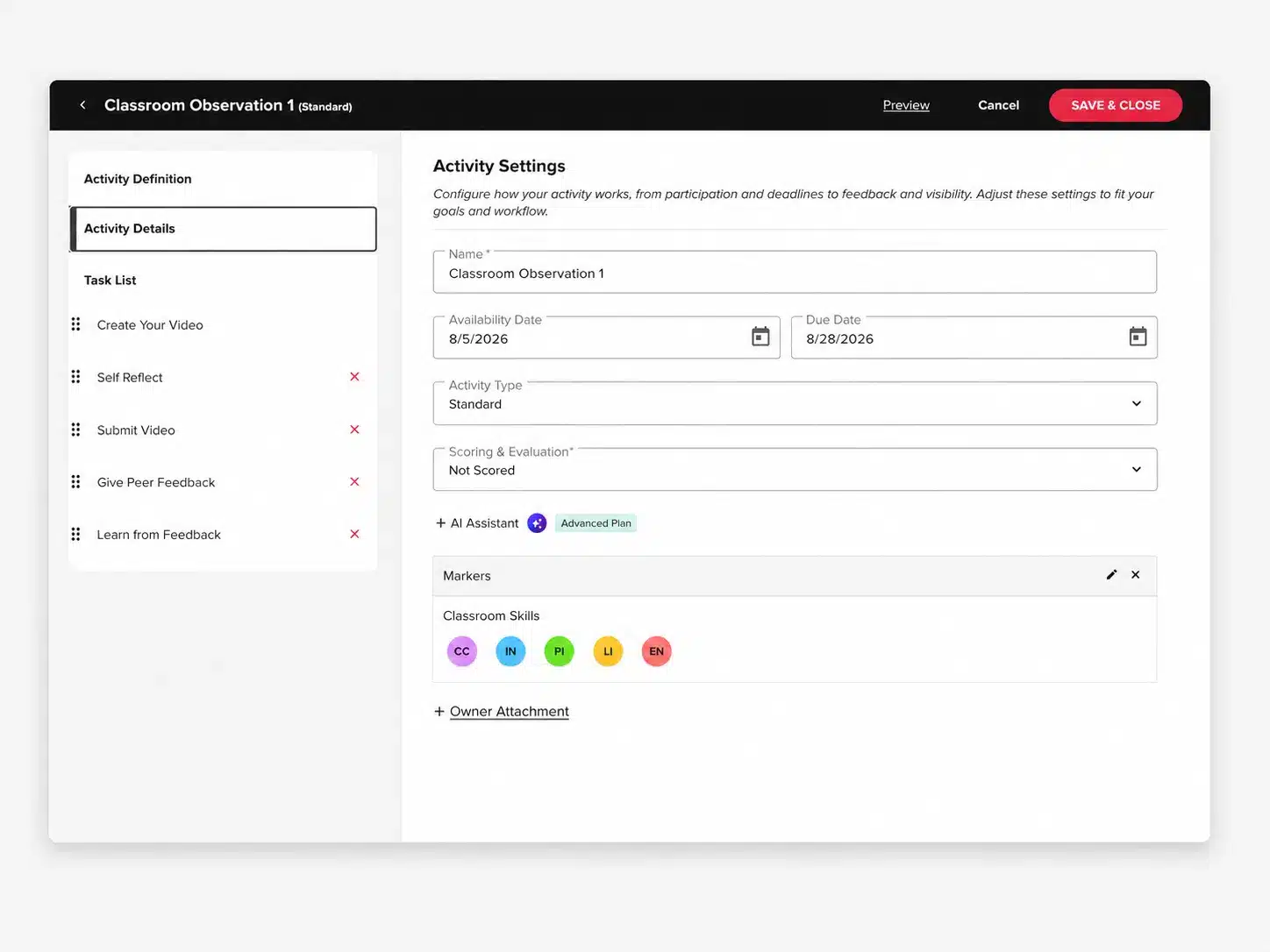
A redesigned full-screen Activity Editor simplifies activity creation
New Task Reports make learner progress easier to monitor
Existing activities automatically transition using their current settings
GoReact, powered by Echo360, improves skill development by allowing learners to record skill practice via video and self-reflect and improve with AI-powered feedback. Activity Tasks, a new feature in GoReact,simplifies this by introducing a guided, task-based workflow that makes learner progress easier to see. By organizing activities into clear steps such as creating a video, reflecting, submitting, and learning from feedback, Activity Tasks helps instructors better understand how learners are engaging and where support may be needed.
Bringing Structure to Skill Development
Skills-based learning is more than submitting a video. Learners build competency through practice, reflection, feedback, and improvement. Activity Tasks guides each of these stages, creating a clearer learning experience while giving instructors greater visibility into progress along the way.
Activity Tasks support this by adding helpful structure across each stage, making it easier to see progress and engagement throughout the activity.
For instructors, Activity Tasks help:
Encourage learners to develop skills more effectively through reflection and feedback
Improve learner usability with clear guidance
Increase visibility into learner progress and engagement
Simpler Activity Creation
The redesigned Activity Editor brings activity settings and task configuration into one workspace.
Instead of moving between multiple editing screens, instructors can:
Add tasks
Remove tasks
Reorder tasks
Configure settings
all from one place.
A More Guided Experience for Learners
Activity Tasks provides a clear checklist that guides learners from recording to reflection, peer feedback, and learning from instructor feedback.
Every completed task builds confidence while helping learners focus on developing skills—not navigating the technology.
Clearer Insight for Instructors
Activity Tasks gives instructors greater confidence that learners are progressing through each stage of the activity. Instead of only seeing a final submission, instructors can understand where learners are practicing, reflecting, engaging with feedback, and completing required tasks.
Combined with Task Reports, Activity Reports, and the redesigned Activity Editor, instructors have greater visibility into learning while maintaining flexibility in how activities are designed.
Instructors can view progress across the activity and quickly understand where each learner is. Using the Task Report and Activity Report, instructors can:
Review each submitted video and provide feedback
See which learners have completed key stages of the activity (task by task)
Quickly identify learners who may be stuck, disengaged, or moving too quickly through the process
Get a high-level view of participation and completion across the activity
Edit the activity as needed
Supporting the Full Learning Cycle
Activity Tasks isn’t simply a redesigned interface. It introduces a more guided learning workflow that helps learners build skills through every stage of the learning process.
By breaking activities into clear, purposeful steps, Activity Tasks removes uncertainty for learners while giving instructors greater visibility into engagement and progress. The result is a more consistent, confidence-building experience that supports meaningful skill development.
Ready to see Activity Tasks?
Take an interactive tour to see how Activity Tasks helps learners know what comes next while giving instructors greater confidence in learner progress.
Explore Echo360.
Learn more about what we can do for your organization